- All Product Innovations
- Cloud Insights
- Connected Devices
- Endpoint Experience
- Internet Insights
- Network and Application Synthetics
- Traffic Insights
- WAN Insights
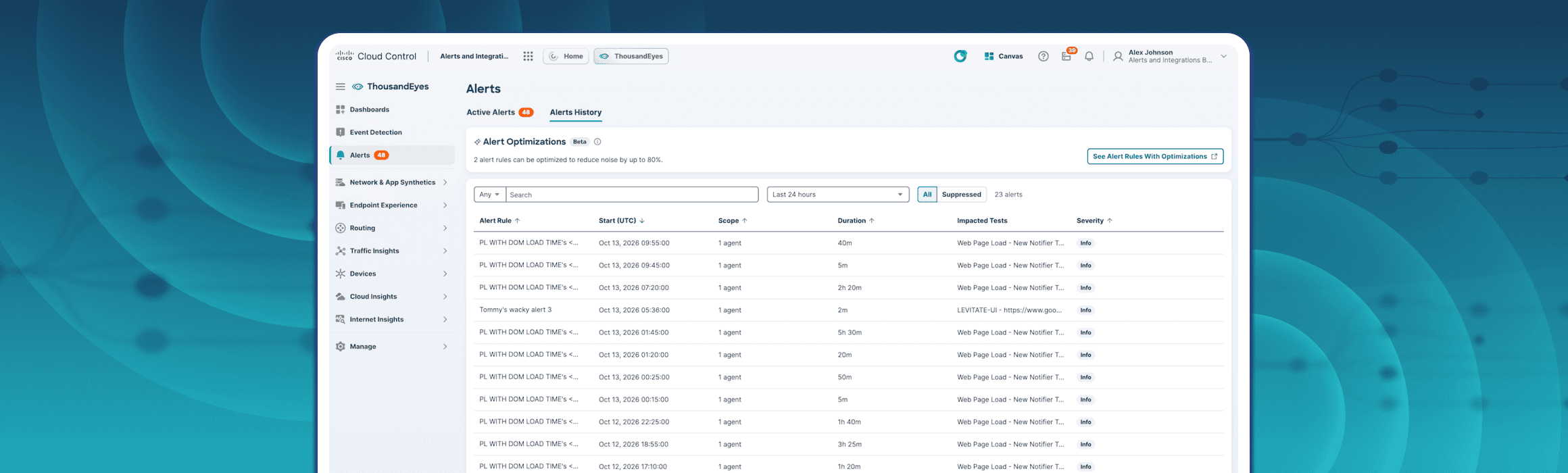
Cut Down on Alert Noise with Alert Optimizations
Alert Optimizations identifies Network & App Synthetics manual alert rules that generate repeated noise and recommends switching them to Adaptive Alerting.
Innovation Overview
Repeated alert notifications can make it harder for operations teams to recognize the issues that need attention. Finding the alert rules responsible for that noise has traditionally required reviewing alert history and manually tuning rule conditions.
Alert Optimizations does that analysis for you. ThousandEyes reviews recent alert activity, identifies Network & App Synthetics manual alert rules that trigger and clear in rapid recovery patterns, and recommends switching those rules to Adaptive Alerting. Recommendations are ranked, so you can begin with the rules likely to have the greatest impact. For an eligible rule, the recommended change can reduce alert noise by up to 80%.
Feature Highlights
Automatic Rule Analysis: ThousandEyes reviews recent alert history and identifies manual alert rules that repeatedly trigger and clear over short cycles.
Prioritized Recommendations: Rules with more repeated trigger-and-clear cycles appear higher in the optimization list, helping you focus on high-impact opportunities first.
Recommendations in the Alert Workflow: Optimization banners and links appear in Alerts > Active Alerts, Alerts > Alert History, and Alerts > Alert Rules. The With Optimizations filter narrows the Alert Rules table to rules with available recommendations.
Direct Action from the Rule: The alert rule side panel explains why an optimization is available and lets an authorized user apply, reject, or dismiss it.
Weekly Refresh: Recommendations refresh weekly as alert activity and rule behavior change.
Availability: Alerts optimization will also be available via ThousandEyes v7 API. ThousandEyes MCP Server, and AI Assistant.
Customer Benefits
Less Repetitive Alert Noise: Adaptive Alerting uses learned patterns from recent test data to distinguish meaningful issues from normal variation.
Faster Rule Tuning: Teams can find noisy rules without manually searching through alert history or repeatedly adjusting thresholds.
More Focused Operations: Prioritized recommendations help operators spend more time on alerts that are likely to require action.
Clear, Controlled Changes: Users can review the recommendation before applying it, and the change affects all tests associated with the selected alert rule.
Follow these quick steps to get familiar with Alert Optimizations:
Go to Alerts > Active Alerts, Alerts > Alert History, or Alerts > Alert Rules.
Select the optimization banner or link to review alert rules with available optimizations.
On Alerts > Alert Rules, select With Optimizations to show only rules with a recommendation.
Open an alert rule to review the Reduce alert noise on this rule recommendation.
Review the rule's recent activity, potential noise reduction, and the recommendation to switch from Manual Thresholds to Adaptive Alerting.
Select Apply Changes to switch the rule to Adaptive Alerting for all associated tests. Your role must include the Edit alert rules permission.
To decline the recommendation, select Reject to remove it permanently, or select X to dismiss it temporarily. A dismissed recommendation can return after the next refresh if the rapid recovery pattern continues.
To view optimizations, your role must include the View alert rules permission.