- All Product Innovations
- Cloud Insights
- Connected Devices
- Endpoint Experience
- Internet Insights
- Network and Application Synthetics
- Traffic Insights
- WAN Insights
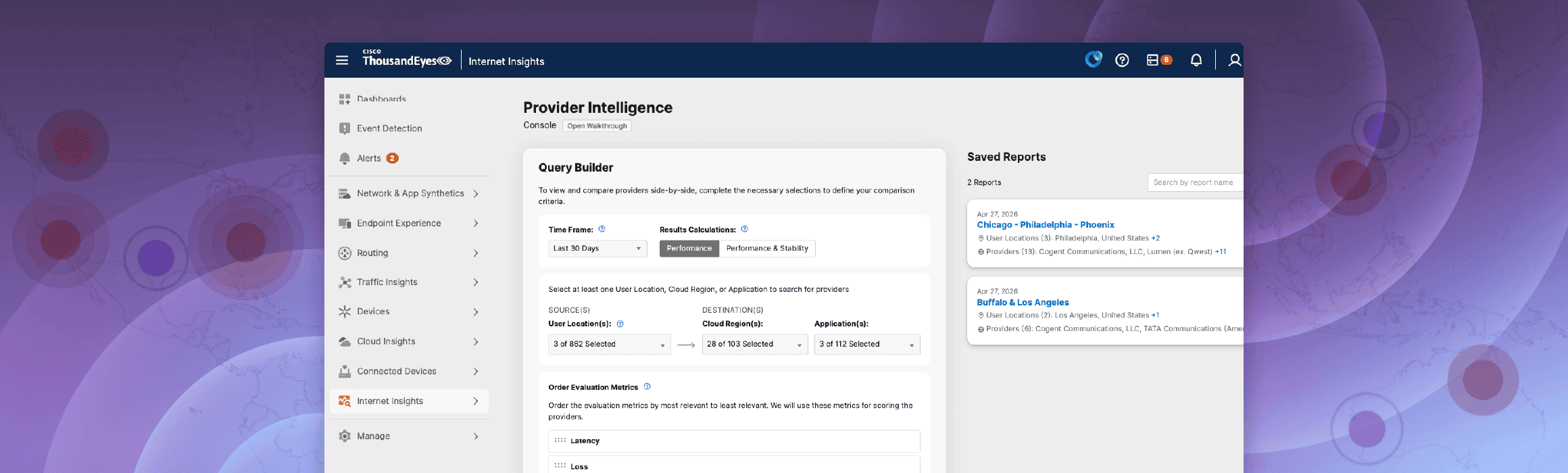
Internet Insights Provider Intelligence
Internet Insights Provider Intelligence extends ThousandEyes collective intelligence from outage awareness to provider evaluation.
Innovation Overview
Internet Insights Provider Intelligence extends ThousandEyes collective intelligence from outage awareness to provider evaluation. It helps teams compare how service providers perform for specific cities and critical destinations over time by using a weighted score built from Latency, Loss, Jitter, and TTFB. Instead of relying on limited pilots, anecdotal feedback, or vendor claims, teams can use consistent ThousandEyes data to benchmark providers, understand tradeoffs, and create report-ready recommendations.
Feature Highlights
Weighted Provider Scoring: Rank providers with a 0-100 score based on the relative importance you assign to Latency, Loss, Jitter, and TTFB.
Performance and Stability Modes: Evaluate providers through the lens that best matches the decision at hand, whether you are prioritizing faster performance or steadier results over time.
Location- and Destination-Based Comparison: Compare providers for selected cities and specific applications or services so results reflect the places and destinations that matter most to your business.
Multi-View Analysis: Start in the Summary View, then move to Single Destination and Time Series Views to inspect rankings, raw metric values, historical trends, and outage counts.
Report Builder: Add shortlisted providers to a report, mark recommendations, and generate an output that is ready to share with stakeholders.
Key Benefits
More Defensible Provider Decisions: Compare providers with a consistent methodology instead of relying on one-off tests, anecdotal user feedback, or marketing claims.
Faster Evaluation Cycles: Move from query to ranking to deeper analysis and reporting in one workflow, reducing the manual effort needed to assess provider options.
Better Alignment Across Teams: Give network operations, architecture, sourcing, and leadership a shared view of provider performance and tradeoffs.
Stronger Planning and Provider Accountability: Use historical trends and underlying measurements to support renewals, regional rollouts, failover planning, and provider conversations.
Follow these quick steps to get familiar with Internet Insights Provider Intelligence:
Navigate to Internet Insights and select Provider Intelligence.
Build your query: Select a time frame (e.g., Last 3 Months) and a calculation mode (Performance or Stability).
Select Locations and Destinations: Choose the cities you are evaluating and the applications (like Webex or Office 365) you want to measure against.
Prioritize Metrics: Drag Latency, Loss, Jitter, and TTFB into your preferred order of importance and click Explore Providers.
Review the Summary View: Check the 0-100 scores and outage counts for providers in each selected city.
Deep Dive into Metrics: Switch to the Single Destination View to see raw values (ms, %) or the Time Series View to see hourly performance charts for up to five providers.
Generate a Report: Select your top providers, click Add Providers to Report, mark your recommendations, and click Preview Report to save or share your findings.