Somewhere between your device and the server at the other end, the Internet makes a series of decisions about how to route your traffic. Most of the time those decisions are invisible and work as expected. When they don't, the result is a service that appears healthy but delivers inconsistent performance, with no obvious explanation.
As part of ongoing research into how emerging access technologies perform under real-world conditions, we maintain monitoring agents across a range of network types, including several Starlink-connected sites. This investigation used two complementary vantage points: an enterprise agent deployed within the Starlink network, giving direct visibility into how the connection behaves from the inside, and cloud agents positioned outside the Starlink network, enabling us to contrast behavior and determine whether what we observed was specific to the Starlink path, a broader service or DNS issue.
From the Perth Starlink site, we observed GitHub response times splitting into two distinct and stable latency bands. One band sat around 55 to 70 ms, consistent with what we expected for that connection. The other clustered around 250 ms, roughly four times higher, and well into the range where application performance becomes noticeably degraded.
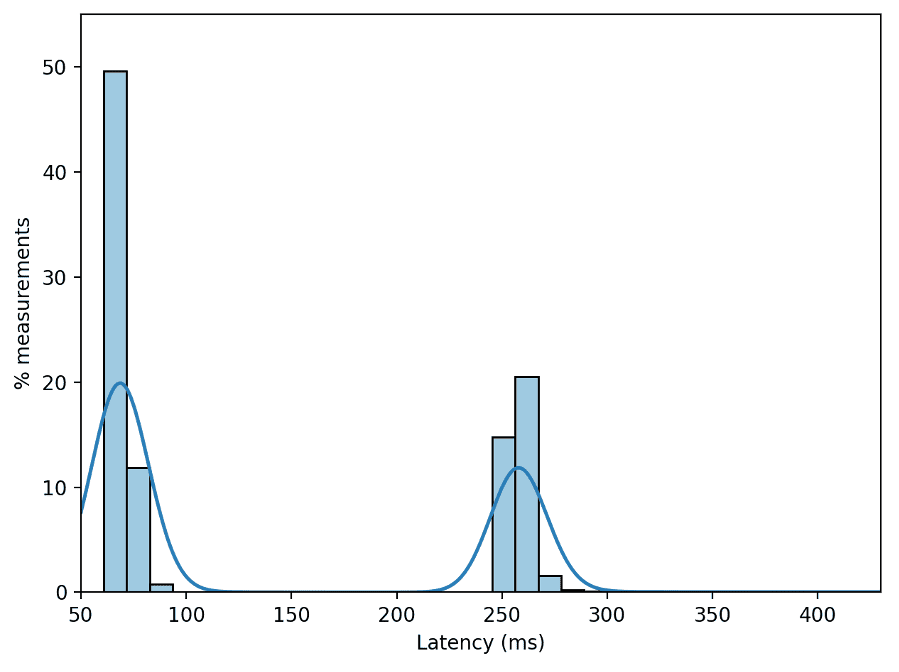
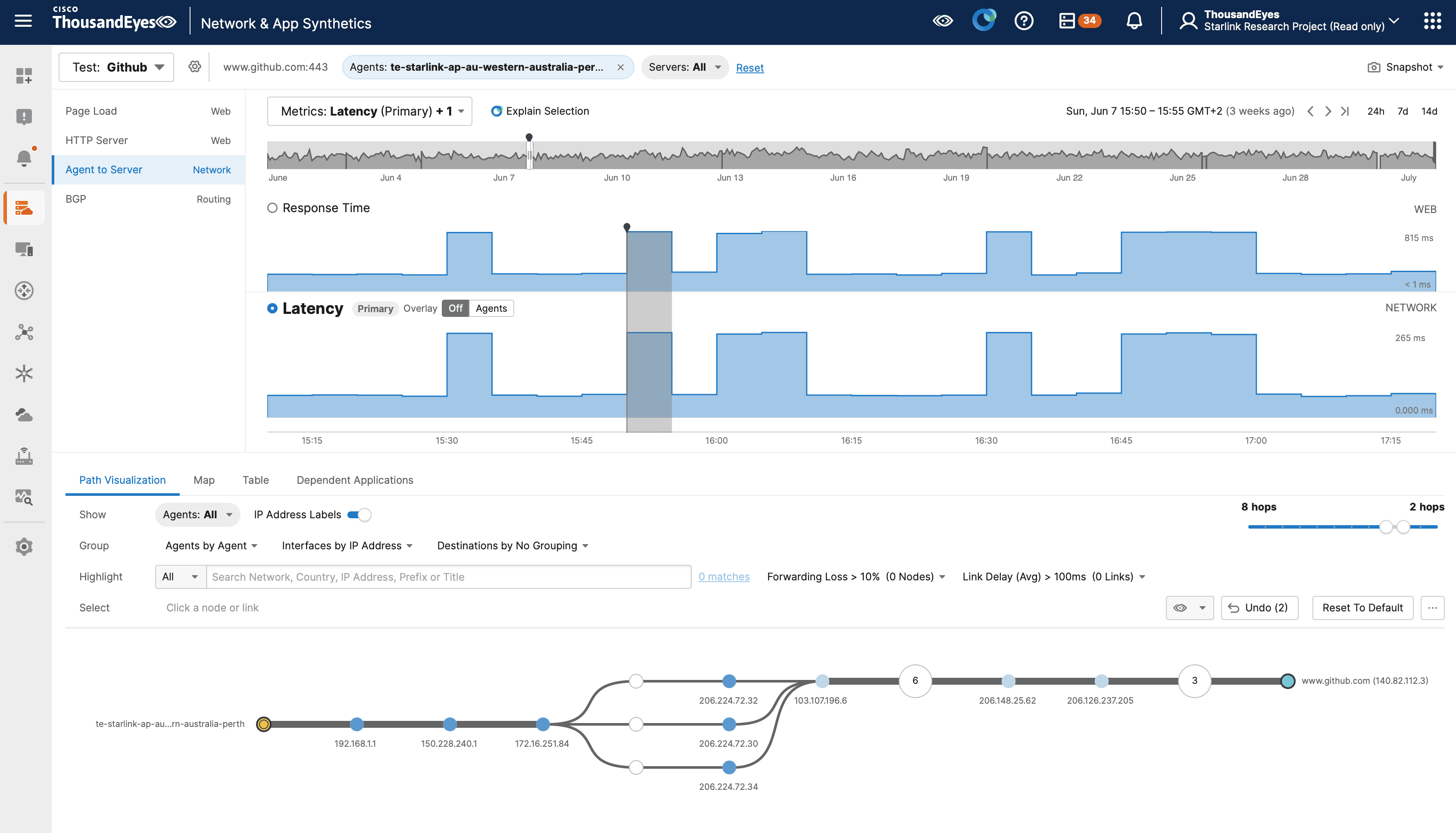
The metrics showed no packet loss, no timeouts, and no failure at the network access-layer. The sole observed anomaly was the latency spike shown in Figure 2, which was expressed as a degraded application experience through elevated response time.
The Setup
The site uses a standard Starlink setup: a Gen2 dish and Starlink-provided router, with the ThousandEyes agent connected via the Ethernet adapter. The ThousandEyes agent received its network configuration via DHCP and the DHCP lease specified the router (192.168.1.1.) as the DNS server. From the agent's perspective, each lookup went to the local Starlink router. From there, the router acted as a DNS forwarder: it accepted the client query, forwarded it to its upstream recursive resolver, and returned the answer to the agent.
What the Data Showed
The split was too consistent to be random variation, which pointed toward something structural in the path.
Two stable latency bands raised an immediate question: was the client reaching the same network destination each time? For large services such as GitHub, DNS is part of the traffic-steering control plane. A DNS server resolving the name can return different endpoints based on resolver location, EDNS Client Subnet (ECS), geolocation data, load state, and cache state.
To find out what was causing the latency spike, we queried multiple public resolvers from the ThousandEyes agent using the ‘dig’ utility and compared answers.
for ns in 1.1.1.1 8.8.8.8 192.168.1.1; do
  echo "== resolver $ns =="
  dig @"$ns" github.com A +short | grep -E '^[0-9.]+$' | sort -u
done
== resolver 1.1.1.1 ==
4.237.22.38
== resolver 8.8.8.8 ==
4.237.22.38
== resolver 192.168.1.1 ==
4.237.22.38
Figure 3: On the first query, all resolvers returned the same GitHub address.
On the first query, all three resolvers returned 4.237.22.38, measuring approximately 69 ms from the site. When the query was repeated, the local DNS forwarder returned a different address for github.com. The public resolvers queried directly continued to return 4.237.22.38.
for ns in 1.1.1.1 8.8.8.8 192.168.1.1; do
  echo "== resolver $ns =="
  dig @"$ns" github.com A +short | grep -E '^[0-9.]+$' | sort -u
done
== resolver 1.1.1.1 ==
4.237.22.38
== resolver 8.8.8.8 ==
4.237.22.38
== resolver 192.168.1.1 ==
140.82.114.4
Figure 4: On a repeated query, the Starlink router's DNS forwarder returned a different GitHub address while the public resolvers continued to return 4.237.22.38.
The 4.237.22.38 address falls within Microsoft Azure address space, consistent with GitHub traffic being served through a content delivery network (CDN). The 140.82.x.x addresses are GitHub-operated address space. From Perth, the latency difference between the two was significant: 69 ms to 4.237.22.38 versus 260 ms to the 140.82.x.x addresses.
140.82.112.4 Approximately 260 ms
140.82.113.4 Approximately 260 ms
140.82.114.4 Approximately 260 ms

4.237.22.38 Approximately 69 ms
Figure 5: 140.82.x.x addresses consistently measured around 260 ms from this site against 69 ms for 4.237.22.38.
The next question was why the two addresses produced such different round-trip times.
How the DNS Determines the Endpoint
When your device looks up a domain name, a DNS query is sent to a local forwarder or recursive resolver and may be answered from cache. If the query is not answered from cache, the resolver eventually queries the authoritative DNS servers for the zone. The authoritative server sees the recursive resolver's source IP address, not the end user's source IP address. EDNS Client Subnet (ECS) lets a recursive resolver include a shortened prefix derived from the client's IP address in the query it sends to the authoritative server.
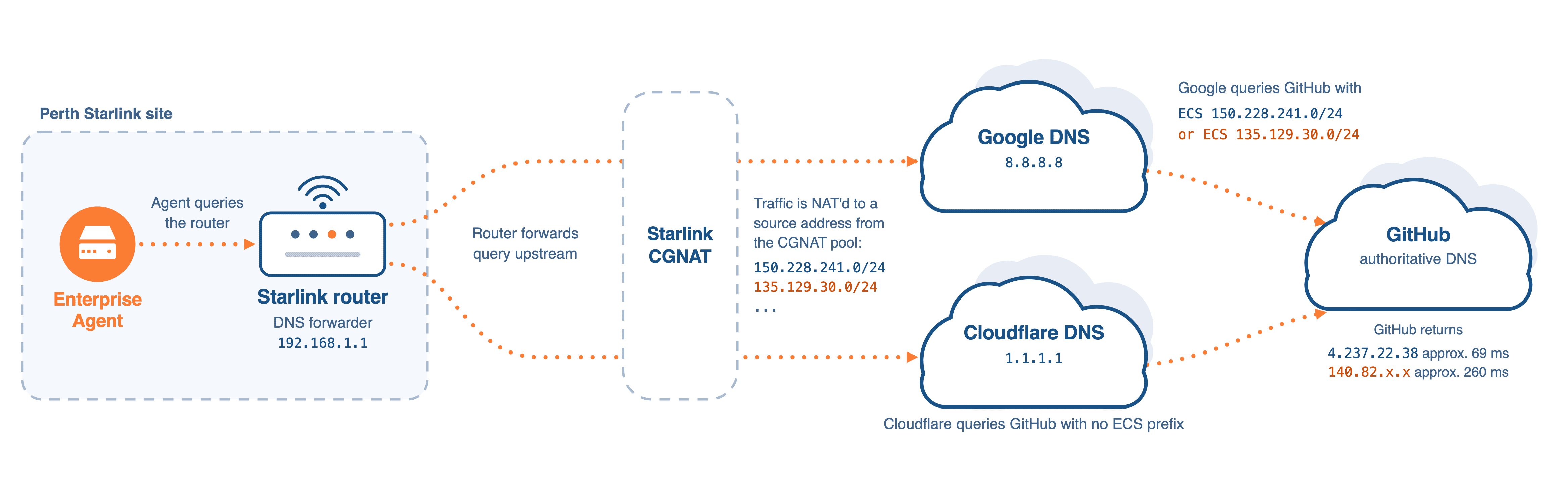
Without ECS, the authoritative server knows only which recursive resolver is asking, not where the end user is. With ECS, the resolver can also include a prefix such as 150.228.241.0/24 or 135.129.30.0/24 as client-subnet metadata, giving the authoritative server a location signal it can use to choose the returned Resource Record Set (RRset). In practice, this typically means selecting a CDN PoP closer to the client rather than one closer to the resolver. In this investigation, it was the difference between a CDN endpoint in Azure space and a GitHub-operated endpoint in GitHub's US east coast infrastructure.
ECS serves as a hint, and that hint is only as accurate as the location data behind the prefix. The resolver sends a network prefix, not a GPS coordinate, so GitHub's authoritative DNS has to map that prefix to a client location. In this case, GitHub's location data for ECS prefix 135.129.30.0/24 appears to have been inaccurate or incomplete. GitHub therefore returned a more distant GitHub-operated endpoint rather than the lower-latency CDN endpoint.
Tracing the DNS Path Upstream
To understand why the same client was receiving different DNS answers, we inspected the metadata each resolver sent upstream. Querying each of the three resolvers for the diagnostic record “o-o.myaddr.l.google.com” revealed two useful pieces of information: the source address that Google's diagnostic service sees for the resolver making the query, and any ECS prefix that resolver is attaching before forwarding upstream.
for ns in 1.1.1.1 8.8.8.8 192.168.1.1; do
  echo "== $ns =="
  dig @"$ns" github.com A +short
  dig @"$ns" o-o.myaddr.l.google.com TXT +short
done
== 1.1.1.1 ==
4.237.22.38
"2400:cb00:84:1024::ac44:5c"
== 8.8.8.8 ==
4.237.22.38
"edns0-client-subnet 150.228.241.0/24"
"172.253.229.146"
== 192.168.1.1 ==
140.82.114.4
"172.253.0.147"
"edns0-client-subnet 135.129.30.0/24"
Figure 6: Resolver egress and ECS prefix.
For 1.1.1.1, the diagnostic returned a Cloudflare resolver egress address, and in this run it was IPv6.The client-to-resolver address family does not have to match the resolver-to-authoritative address family, so an IPv4 client query can still result in an IPv6 upstream query. No ECS prefix appears because Cloudflare does not forward client-subnet information upstream.
1.1.1.1: Cloudflare, no ECS forwarded
8.8.8.8: Google, ECS 150.228.241.0/24
192.168.1.1: Google, ECS 135.129.30.0/24
Figure 7: ECS prefix by resolver - summary.
Figure 7 shows more than a difference in resolver IPs. The ThousandEyes agent sits behind two layers of NAT: the Starlink router's local NAT at 192.168.1.1, and Starlink's own Carrier-Grade NAT (CGNAT) beyond that. What we observed was that queries sent directly from the agent to Google emerged with a source address within the 150.228.241.0/24 prefix, while queries forwarded through the Starlink router, occasionally, emerged with a source address within the 135.129.30.0/24 prefix. Both paths originate from the same physical site. The difference in source addresses is consistent with Starlink's use of CGNAT, where outbound traffic from a shared IP pool can produce different public addresses depending on session state and pool assignment. Google's resolver therefore derived a different ECS prefix, 135.129.30.0/24, and sent that prefix to the authoritative server. The authoritative server was working from a different client location signal than the one Google received when queried directly.
Confirming ECS as the Deciding Factor
To confirm that ECS was determining which address GitHub's authoritative DNS returned, we queried the same name while explicitly setting the EDNS Client Subnet option with dig +subnet.
$ for subnet in 135.129.30.0/24 150.228.241.0/24 0.0.0.0/0; do
  echo "== ECS $subnet =="
  for ns in 8.8.8.8 1.1.1.1; do
    echo "-- $ns"
    dig @$ns github.com A +short +subnet=$subnet
  done
done
== ECS 135.129.30.0/24 ==
-- 8.8.8.8
140.82.112.3
-- 1.1.1.1
4.237.22.38
== ECS 150.228.241.0/24 ==
-- 8.8.8.8
4.237.22.38
-- 1.1.1.1
4.237.22.38
== ECS 0.0.0.0/0 ==
-- 8.8.8.8
4.237.22.38
-- 1.1.1.1
4.237.22.38
Figure 9: Response by ECS prefix and resolver.
With ECS prefix 135.129.30.0/24, Google Public DNS forwarded the client-subnet value and GitHub returned the slower 140.82.x.x endpoint. Cloudflare's 1.1.1.1 did not forward ECS to authoritative servers. By design it removes the client-subnet option before the query leaves its infrastructure, regardless of whether the client explicitly supplied one. GitHub therefore received no client-subnet hint and steered based on the Cloudflare resolver's own location instead, returning the faster 4.237.22.38 endpoint.
This was not simply a question of which recursive resolver answered the query. It was a question of what metadata reached GitHub's authoritative DNS. The resolver choice determined whether ECS reached the authoritative server, which prefix it carried, and therefore which endpoint GitHub's steering system returned.
Missing or Stale Geolocation for 135.129.30.0/24
The ECS experiment explains the mechanism, but not why two different prefixes from the same geographic location produced different address mappings from GitHub's authoritative DNS. The likely root cause is that the client-subnet hint 135.129.30.0/24 was not mapped to Perth in the location data available to GitHub's DNS steering system.
Starlink publishes a first-party geofeed-style CSV, consistent with the RFC 8805 model for self-published IP geolocation data, and also publishes a prefix-to-PoP map. Checked on 05 Aug 2026, those public Starlink feeds included several Perth mappings, including 150.228.241.0/24, but did not include 135.129.30.0/24 as a Perth prefix. GeoIP databases checked on the same date were not consistent: MaxMind GeoLite2 placed the prefix in the United States while IPinfo returned results consistent with Perth. The disagreement confirms that the prefix carried an ambiguous location signal, independent of the Starlink network itself.
That absence is important because authoritative DNS steering systems need a prefix-to-location or prefix-to-topology mapping. If GitHub's DNS steering system receives ECS 150.228.241.0/24, it has a strong signal that the client is in Perth. If it receives ECS 135.129.30.0/24 and that prefix is absent from the provider's published geofeed and PoP map, the platform has to fall back to some other input: commercial GeoIP data, active measurement, BGP and routing context, resolver location, internal telemetry, or cached historical state.
Why This Kind of Problem Persists
DNS caching made the inconsistent answers intermittent. Recursive resolvers cache answers alongside the ECS subnet scope, so a cached response can hide the divergence until the TTL expires, and a fresh lookup returns a different mapping.
Without correlating DNS mappings to latency, the root cause is not obvious. The Starlink access layer looks healthy, the service still resolves, and users experience the issue only as intermittent slowness.
The Broader Picture
This investigation started as a GitHub latency question and ended as a case study in how control-plane decisions made outside the access network can determine the application experience a user receives.
Each component in the chain appeared to do something valid in isolation: the Starlink DNS forwarder, the upstream recursive resolver, ECS, GitHub's authoritative DNS, and GitHub's traffic steering logic. The failure emerged from the interaction between those systems and an inaccurate or incomplete location signal for the ECS prefix.
ECS works by treating the subnet in the DNS forwarding path as a signal for where the user is. On terrestrial networks, that assumption often holds well enough: access infrastructure is geographically anchored, and address blocks usually correspond to metro, regional, or national footprints. On a LEO satellite network, the relationship is weaker. A user's physical location, ground infrastructure, public egress, DNS forwarding path, and assigned public prefix are not necessarily the same geographic fact.
The most direct mitigation in this case is to use a resolver that does not forward ECS, such as Cloudflare's 1.1.1.1. Removing the subnet hint caused GitHub's authoritative DNS to steer based on resolver location instead, and it consistently returned the faster endpoint. This addresses the symptom, not the underlying geolocation gap.
The practical lesson is straightforward: DNS steering decisions can change the application path even when the access network is healthy.
Conclusion
The latency spikes we observed were not a transport-layer failure, and they were not consistent with a GitHub service degradation. They were the visible consequence of DNS steering selecting two different GitHub destinations. When the DNS used ECS subnet 135.129.30.0/24, GitHub returned 140.82.x.x and latency to the site measured approximately 260 ms. When that hint was absent, or when the DNS path carried the Perth-mapped 150.228.241.0/24 prefix, GitHub returned 4.237.22.38 and the site measured approximately 69 ms.
The evidence points strongly to ECS as the mechanism. The likely root cause is incomplete or stale geolocation for 135.129.30.0/24: Starlink's own public geofeed and PoP map did not map that prefix to Perth, while other Perth prefixes were present, and external geolocation views disagreed on where the prefix belonged. ECS turned that geolocation gap into an application performance problem.
No component in the chain appeared to be broken. The system appeared to be working as designed. The question this case raises is whether DNS-based steering systems can continue to treat IP prefixes as reliable location proxies when the access architecture no longer makes that assumption safe.